
Hacking the UNIHIKER K10: From MicroPython Limits to Bare-Metal ESP-IDF and LVGL
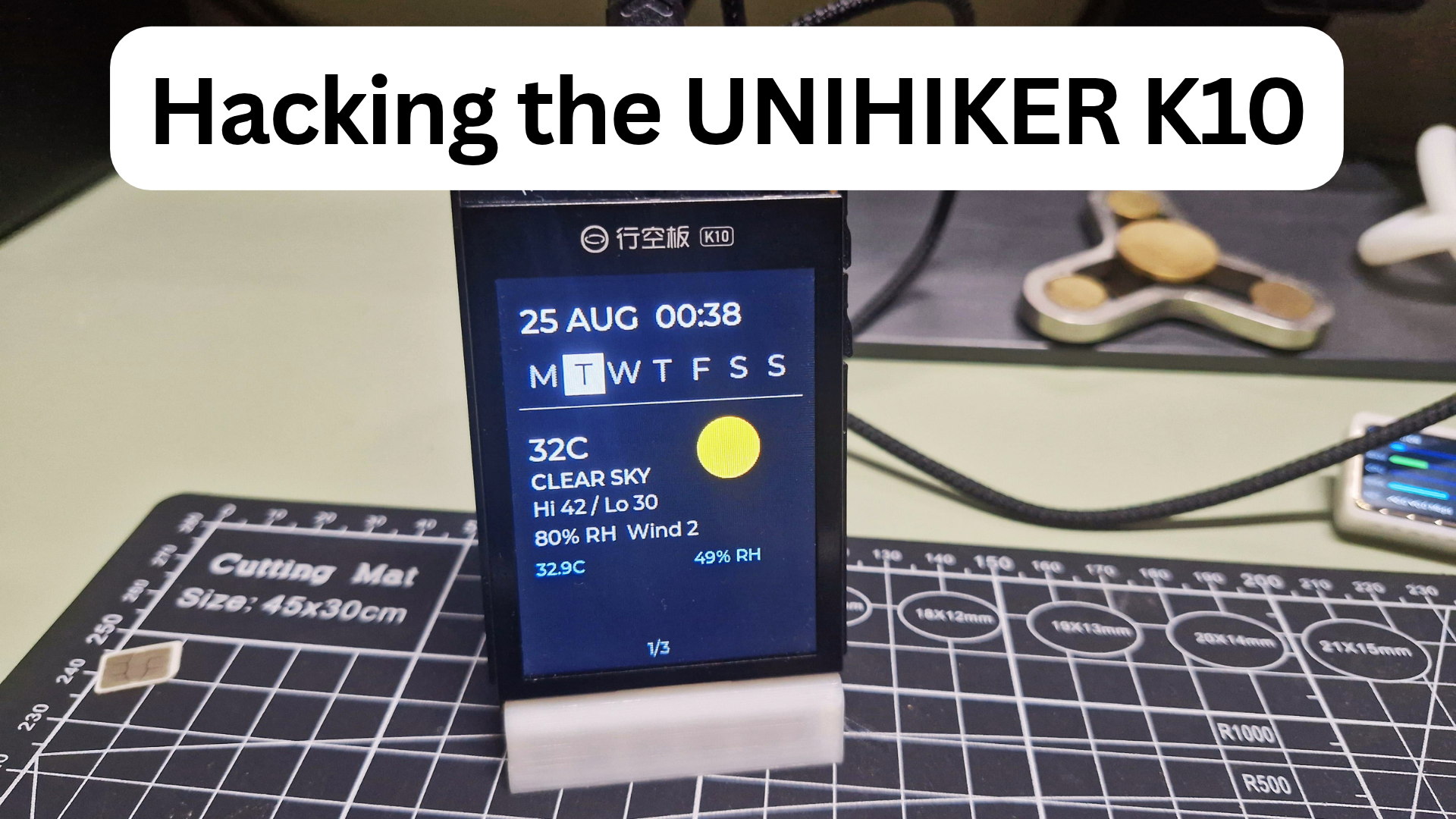
The DFRobot UNIHIKER K10 (DFR0992) looks on paper like an ideal compact IoT device: an ESP32-S3-WROOM-1 (8MB PSRAM, 16MB Flash), an onboard 2.8-inch color TFT, an AHT20 temperature/humidity sensor, dual MEMS microphones, an accelerometer, and a 2MP camera.
DFRobot ships it with a preview MicroPython runtime geared toward education. However, using it for a continuous, responsive, multi-screen desktop dashboard (live weather with local NTP time, a real-time Bitcoin ticker with 24-hour sparklines, and Formula 1 championship standings) quickly exposes the limitations of the stock firmware.
Here is the engineering journey of prototyping the dashboard in MicroPython, hitting hardware abstraction walls, diving into the schematics, and writing a bare-metal ESP-IDF (C) port with LVGL.

The Prototype: Multi-Screen MicroPython Dashboard
The initial goal was rapid implementation in MicroPython. The dashboard was structured into modular screen components managed by an event loop:
- Weather Screen: Outdoor metrics from Open-Meteo (no API key required), indoor temperature and relative humidity sampled directly from the onboard AHT20 sensor over I2C, plus local time synced via SNTP with a Monday–Sunday day-of-week indicator.
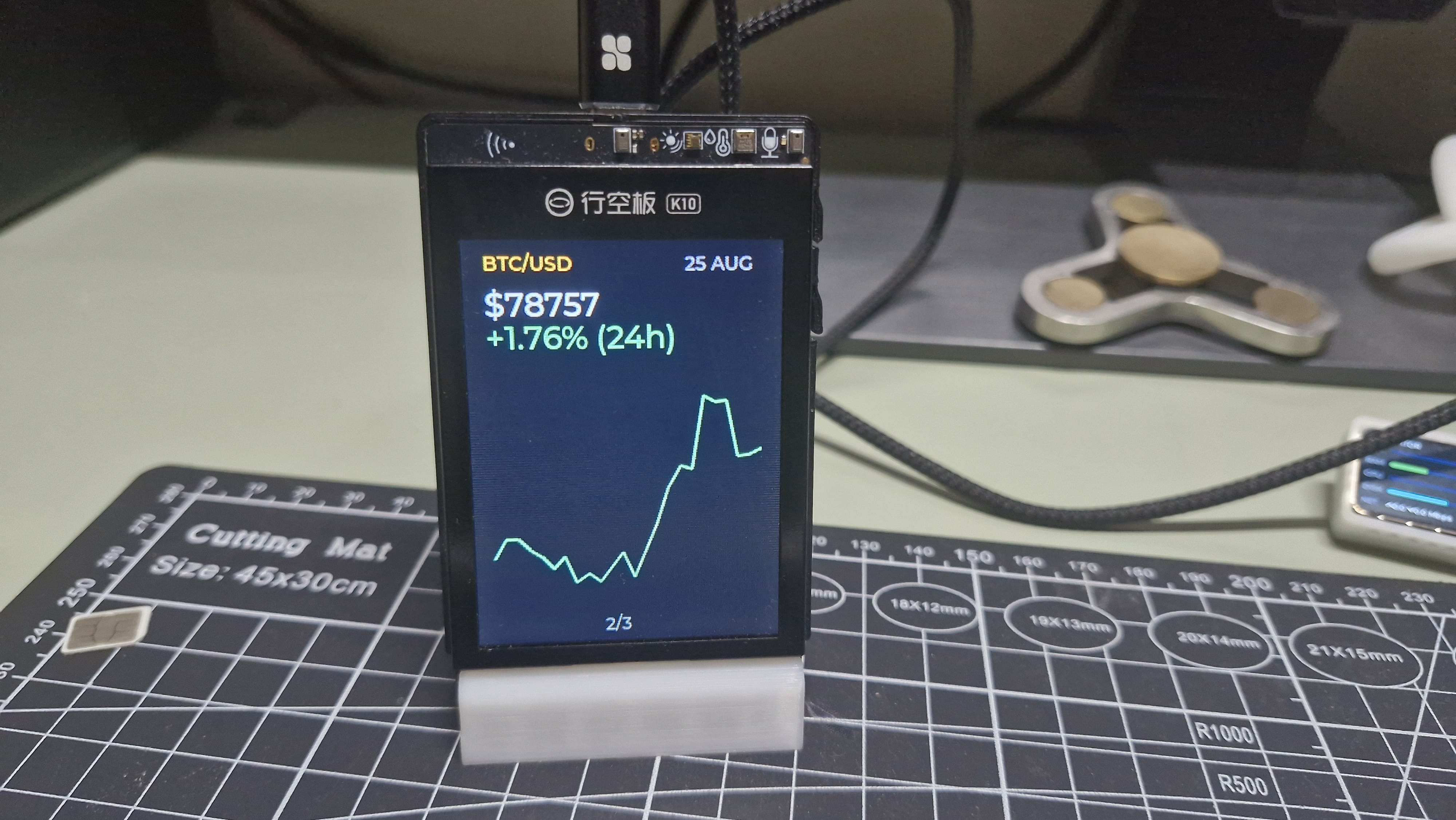
- Bitcoin (BTC) Screen: Live price, 24-hour percentage delta, and a historical 24-hour sparkline from CoinGecko, falling back dynamically to the public Binance API (
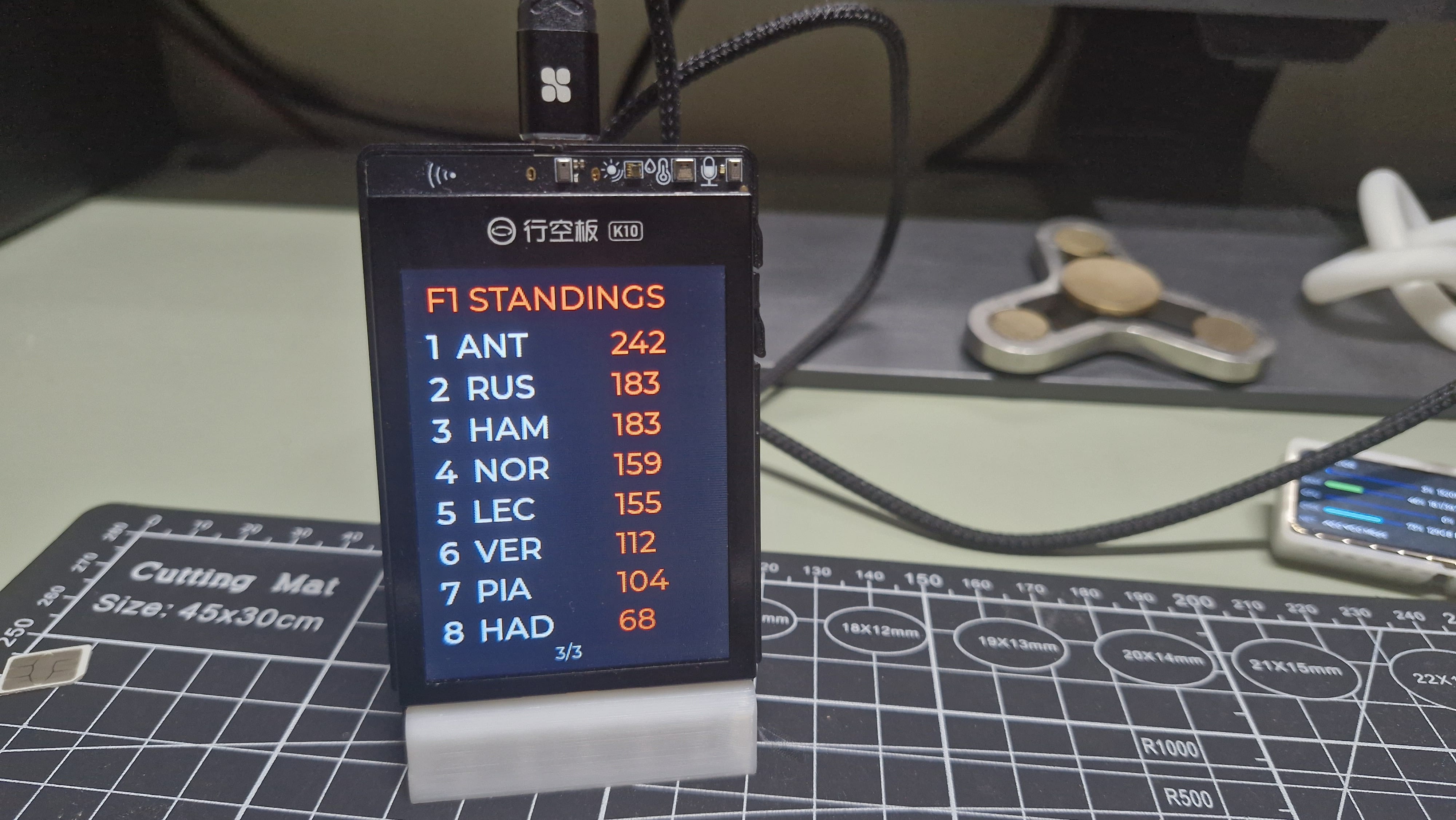
/api/v3/ticker/24hrand/api/v3/klines) on network or rate-limit failures. - Formula 1 Screen: Top-8 driver championship standings sourced from the Jolpica-F1 Ergast-compatible API.
       +-------------------------------------------------------+
       |                  Main Event Loop                      |
       +-------------------------------------------------------+
              |                    |                    |
     [Poll Button A]      [Non-blocking WiFi]    [Background Fetches]
              |                    |                    |
       Cycles Active        Tracks STA State       Independent Cadence:
          Screen                                    - Weather: 10 min
              |                                     - Indoor:  30 sec
              +------------> [Render Active] <------+ - BTC:     10 min
                                                    - F1:      6 hours
Roadblocks in the MicroPython Runtime
While functional, several firmware and hardware driver quirks emerged:
- The 25% Landscape Canvas Bug: Setting landscape mode via
screen.init(dir=3)failed to reconfigure the column-addressing window of the display controller. Only the leftmost ~236 pixels of the claimed 320-pixel canvas rendered, clipping the remaining 84 pixels with visual artifacts. The MicroPython implementation was forced into portrait mode (dir=2, 240x320). - Font Metrics & Lowercase Descenders: The preview firmware only includes Montserrat sizes 14, 16, and 24. At sizes 16 and 24, lowercase characters with descenders (
g,y,p) clipped or shifted upward above the baseline. The fix was forcing uppercase strings (.upper()) across critical display labels. - Unbounded Network Sockets: An unhandled socket stall in
urequests.get()blocked the single-threaded Python event loop indefinitely, freezing the display on boot. Adding explicit socket timeouts (timeout=10) across all HTTP calls and migrating to a non-blockingnetwork.WLAN(network.STA_IF)association routine prevented watchdog-style lockups. - Bricked Flash Recovery: Standard
esptool erase_flashfollowed by writing a raw binary corrupted the board’s filesystem table. Restoring the factory MicroPython environment required entering forced-flash bootloader mode and executing DFRobot Mind+ V2’s “Restore Device Initial Settings”.
To bypass these driver constraints, unlock the native 320x240 landscape layout, and implement true hardware interrupts, the project moved to bare-metal ESP-IDF.
Reverse-Engineering the K10 Hardware
DFRobot’s schematic (UnihikerK10Schematic.pdf, rev V1.0) revealed critical hardware details not exposed in the high-level MicroPython documentation:
+-------------------------------------------------------------------------+
|                        UNIHIKER K10 Architecture                        |
|                                                                         |
|   +-----------------------+              +--------------------------+   |
|   |                       |  SPI2 (MOSI) |   2.8" ILI9341 TFT       |   |
|   |                       |------------->|   320x240 Display        |   |
|   |                       |              +--------------------------+   |
|   |                       |                           ^                 |
|   |                       |                           | LCD_BLK (P00)   |
|   |                       |  I2C (SDA/SCL)  +-----------------------+   |
|   |      ESP32-S3         |---------------->| XL9535 GPIO Expander  |   |
|   |                       |<----------------| (Addr 0x20)           |   |
|   |                       |  GPIO44 (INT)   +-----------------------+   |
|   |                       |                             ^               |
|   |                       |                   Button A / Button B       |
|   |                       |                                             |
|   |                       |  GPIO38 (Mute)  +-----------------------+   |
|   |                       |---------------->| NS4168 Class-D Amp    |   |
|   +-----------------------+                 +-----------------------+   |
+-------------------------------------------------------------------------+
Key Hardware Discoveries:
- Buttons A/B & Backlight Are on an I2C Expander: Physical buttons A (P14) and B (P02) are not connected to native ESP32 GPIOs. They route through an XL9535 I2C GPIO expander (
0x20). Even the display backlight transistor (LCD_BLK) is gated through expander pin P00. Reading buttons requires reading register0x00/0x01over I2C, or trapping the expander’s active-lowINTline on ESP32 GPIO44. - Display Controller Identity: The display controller is an ILI9341 operating over write-only SPI (GPIO12 SCLK, GPIO13 DC, GPIO14 CS, GPIO21 MOSI; no MISO net exists), not an ST7789 as implied by MicroPython filenames.
- UART Console vs. Hardware Interrupts: By default, ESP-IDF assigns UART0 console TX/RX to GPIO43 and GPIO44. However, GPIO44 is tied to the XL9535 interrupt line (
BUS_INT), and GPIO43 is the clock line (SCLK3) for the SD card and font ROM. Leaving the default console configuration causes bus contention. The console was moved to the ESP32-S3 native USB-Serial/JTAG peripheral (CONFIG_ESP_CONSOLE_USB_SERIAL_JTAG=y). - Floating Speaker Amplifier: The onboard NS4168 class-D amplifier’s
CTRLinput shares theI2S_LRCKnet (GPIO38). When left floating, the amplifier remains active and amplifies ground plane and power rail switching noise, resulting in an audible hiss.
Developing the Native ESP-IDF Port
A Dockerized build environment (k10-idf) was set up using ESP-IDF v5.x and the esp_lvgl_port managed component. The app was allocated a custom 4MB partition (partitions.csv) within the board’s 16MB flash space.
1. XL9535 Driver & Interrupt-Driven Buttons
Rather than polling the I2C bus every few hundred milliseconds, an active-low edge-triggered ISR was attached to GPIO44:
static void IRAM_ATTR xl9535_isr_handler(void *arg) {
    BaseType_t high_task_wakeup = pdFALSE;
    vTaskNotifyGiveFromISR(s_main_task_handle, &high_task_wakeup);
    portYIELD_FROM_ISR(high_task_wakeup);
}
The main task waits via ulTaskNotifyTake(). When a button is pressed or released, the ISR unblocks the task immediately to process the state change, eliminating UI lag.
2. Resolving the Display Color Inversion Bug
Bringing up the ILI9341 via esp_lcd surfaced an unusual color-rendering issue: pure red (0xE10600) rendered as navy blue, and orange rendered as red, while the background remained jet black.
Testing confirmed that setting esp_lcd_panel_invert_color() turned the black background white, confirming panel inversion was incorrect. Because black (0x0000) is invariant under byte swapping, the actual issue was a combination of byte endianness and subpixel element ordering over the 8-bit SPI bus.
The solution required configuring two independent settings simultaneously:
CONFIG_LV_COLOR_16_SWAP=yinsdkconfigto swap the byte order of the 16-bit RGB565 stream..rgb_ele_order = LCD_RGB_ELEMENT_ORDER_BGRin theesp_lcd_panel_dev_config_tdriver struct.
3. Display Rotation: Native 320x240 Landscape
With the ILI9341 driver correctly configured, landscape mode was enabled cleanly without the MicroPython clipping defect:
lvgl_port_display_cfg_t disp_cfg = {
    .panel_handle = panel_handle,
    .buffer_size = LCD_H_RES * 40,
    .double_buffer = true,
    .hres = 320,
    .vres = 240,
    .rotation = {
        .swap_xy = true,
        .mirror_x = true,
        .mirror_y = true,
    },
};
Muting the Floating Audio Amplifier
To kill the speaker hiss at startup, GPIO38 is initialized and asserted LOW immediately in app_main():
gpio_config_t io_conf = {
    .pin_bit_mask = (1ULL << GPIO_NUM_38),
    .mode = GPIO_MODE_OUTPUT,
    .pull_up_en = GPIO_PULLUP_DISABLE,
    .pull_down_en = GPIO_PULLDOWN_ENABLE,
    .intr_type = GPIO_INTR_DISABLE,
};
gpio_config(&io_conf);
gpio_set_level(GPIO_NUM_38, 0); // Force NS4168 CTRL into shutdown mode
The Result: A Production-Grade IoT Desk Monitor
The resulting ESP-IDF firmware delivers a responsive, reliable interface running on LVGL:
+-------------------------------------------------------------+
| 28 OCT  14:32   [M][T][W][T][F][S][S]                       |
|-------------------------------------------------------------+
|  24.2°C      Partly Cloudy                 ( Sun Icon )     |
|  H: 28° L: 19°                                              |
|  Humidity 52%   Wind 12 km/h                                |
|                                                             |
|  Indoor: 23.1°C   48% RH                                    |
|                                                     [1/3]   |
+-------------------------------------------------------------+
- Weather Screen: Real-time outdoor temperatures, high/low forecasts, wind speed, and humidity rendered with Montserrat typography. Live indoor metrics from the AHT20 update every 30 seconds. Local time syncs via
esp_netif_sntpwith automatic DST/timezone offset application. - Bitcoin Ticker: 10-minute automated pricing updates with 24-hour delta and a sparkline chart rendered using LVGL’s
lv_linewidget from historical market data. - F1 Standings: Two-column landscape table rendering P1 through P8 drivers and their cumulative championship points.
Summary: Architecture Comparison
| Feature / Subsystem | MicroPython (weather_display) |
Native ESP-IDF (k10_esp_idf) |
|---|---|---|
| Language / UI | MicroPython v1.26 + custom canvas API | C (FreeRTOS) + LVGL 8/9 |
| Display Resolution | 240x320 Portrait (Landscape bugged) | 320x240 Landscape (swap_xy=1, mirror_x/y=1) |
| Button Input | 300ms software polling loop | Hardware GPIO interrupt via XL9535 BUS_INT |
| Network Resilience | Manual timeouts required per request | esp_http_client + mbedtls + cJSON |
| Audio Amp State | Floating pin (audible idle hiss) | GPIO38 driven low at boot (silent shutdown) |
| Flash Efficiency | Stock filesystem | 4MB custom partition table on 16MB flash |
By bypassing high-level SDK abstractions and programming against the hardware schematic, the UNIHIKER K10 transforms from an educational dev board into a capable, production-grade embedded IoT workstation.