
Building Jpegoptim GUI: A Zero-Dependency Standalone Windows Image Optimizer
How to compile a high-performance C# WPF frontend for jpegoptim into a single 1MB binary using built-in Windows csc.exe with embedded resources and asynchronous execution.
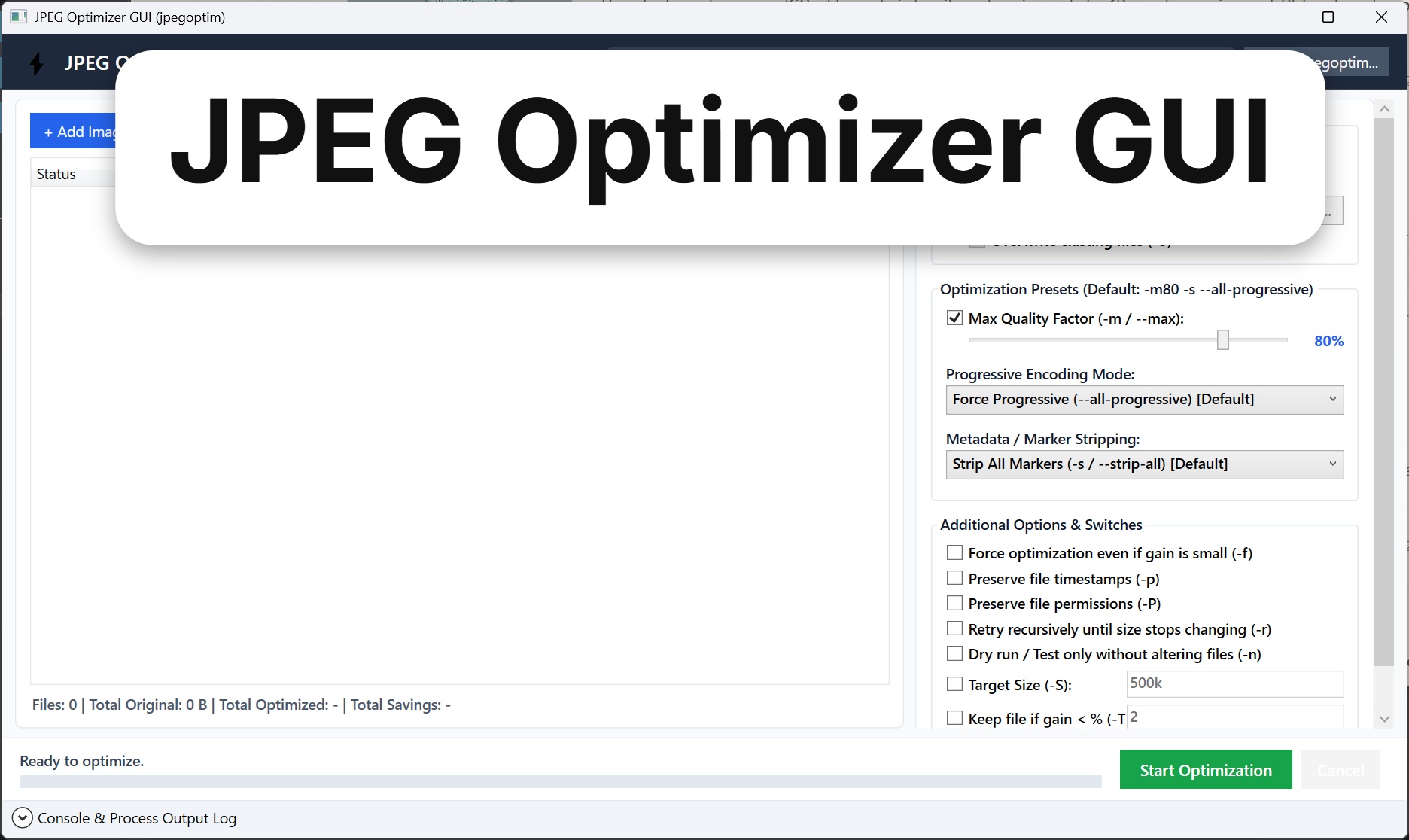
Static engineering blogs and documentation portals live and die by asset performance. High-resolution oscilloscope captures, PCB layout diagrams, and hardware photos easily run $5\text{–}15\text{ MB}$ each straight out of cameras and CAD exports. Uncompressed, they wreck page load speeds, inflate Cloudflare cache bandwidth, and destroy Google Lighthouse scores.
The command-line tool jpegoptim is universally recognized as the gold standard for JPEG optimization: it supports lossless optimization by stripping redundant metadata markers (EXIF, IPTC, ICC, XMP comments) and high-fidelity lossy quantization (--max=80) with progressive encoding.
However, invoking CLI commands on nested image folders during daily writing is friction-heavy. Existing Windows GUI wrappers often require bloated Electron runtimes ($>100\text{ MB}$) or modern .NET SDK installations.
We built jpegoptim-gui: a clean, responsive Windows desktop frontend that compiles into a single, self-contained 1MB executable using tools already installed on every Windows 10/11 system.
1. Zero-Dependency Constraint: Bypassing the SDK Bloat
Modern desktop framework choices typically introduce massive distribution footprints:
| Architecture | Distribution Footprint | Runtime Dependency on Fresh Windows 10/11 |
|---|---|---|
| Electron / Tauri | $80\text{–}120\text{ MB}$ | Chromium + Node.js bundle overhead |
| .NET 8 Self-Contained | $60\text{–}75\text{ MB}$ | Bundled CLR runtime + BCL libraries |
| Python + PySide/Tkinter | $35\text{–}50\text{ MB}$ (PyInstaller) | High memory usage, slow cold start |
| .NET Framework 4.8 (WPF) | $1.0\text{ MB}$ (with embedded CLI) | Zero (Native OS inbox component) |
Every modern Windows 10 and 11 installation ships out of the box with the .NET Framework 4.8 runtime and its legacy C# compiler (csc.exe).
By targeting WPF directly and compiling with stock csc.exe, the application requires zero external runtimes, zero Visual Studio installations, and zero package downloads.
2. Embedded Resource & 4-Tier Engine Resolution
To maintain a true “single-file zero-install” workflow, the native 64-bit jpegoptim.exe binary is embedded directly into the compiled assembly’s manifest resources during build:
# build.ps1 embedding the binary
& $cscPath /target:winexe `
           /out:"bin\JpegoptimGUI.exe" `
           /resource:"tools\jpegoptim.exe,tools.jpegoptim.exe" `
           /recurse:"src\*.cs"
At runtime, the application resolves the optimization engine through an intelligent 4-tier fallback sequence:
[ Application Startup ]
          │
          ├─► 1. User-Configured Custom Path (Saved from "Locate jpegoptim..." dialog)
          │      └── Found? ──► Use engine
          │
          ├─► 2. Adjacent Directory Checks (./jpegoptim.exe or ./tools/jpegoptim.exe)
          │      └── Found? ──► Use engine
          │
          ├─► 3. System Environment PATH (where.exe jpegoptim)
          │      └── Found? ──► Use engine
          │
          └─► 4. Self-Extracting Manifest Resource Fallback
                 └── Auto-extracts embedded binary to %LOCALAPPDATA%\JpegoptimGUI\jpegoptim.exe
public static string ResolveEnginePath(string customPath = null)
{
    // 1. Explicit UI override
    if (!string.IsNullOrEmpty(customPath) && File.Exists(customPath))
        return customPath;

    // 2. Local directory check
    string appDir = AppDomain.CurrentDomain.BaseDirectory;
    string localCandidate = Path.Combine(appDir, "jpegoptim.exe");
    if (File.Exists(localCandidate)) return localCandidate;

    // 3. System PATH check
    string pathEnv = Environment.GetEnvironmentVariable("PATH") ?? "";
    foreach (var dir in pathEnv.Split(Path.PathSeparator))
    {
        string candidate = Path.Combine(dir.Trim(), "jpegoptim.exe");
        if (File.Exists(candidate)) return candidate;
    }

    // 4. Extract embedded resource fallback
    return ExtractEmbeddedResource();
}
If a developer drops a newer version of jpegoptim.exe into their PATH or alongside the app, it automatically uses it; if a casual user runs the bare EXE from their Downloads folder, the embedded fallback executes silently without error.
3. UI Features & Batch Queuing
+─────────────────────────────────────────────────────────────────────────────+
|  JPEG Optimizer GUI (jpegoptim v1.5.6)               [ Engine: Embedded OK ]|
+─────────────────────────────────────────────────────────────────────────────+
|  [ + Add Images... ]  [ + Add Folder... ]  [ Clear Queue ]    (Drag & Drop) |
+─────────────────────────────────────────────────────────────────────────────+
|  File Name            Original Size   Optimized Size   Savings     Status    |
|  ─────────────────────────────────────────────────────────────────────────  |
|  pcb_render_hero.jpg      4.82 MB         742 KB        -84.9%     Completed |
|  schematic_revB.jpg       2.11 MB         388 KB        -82.0%     Completed |
|  scope_transient.jpg      8.45 MB       1,120 KB        -87.1%     Optimizing|
+─────────────────────────────────────────────────────────────────────────────+
|  Optimization Settings:                                                     |
|  [X] Lossy Quality: [=======|======] 80%   [X] Strip All Metadata (-s)      |
|  [X] Force Progressive Encoding            [ ] Target Size (-S): [       ]  |
|  Output: (o) Overwrite In-Place            ( ) Custom Folder: [ Browse... ] |
+─────────────────────────────────────────────────────────────────────────────+
|  [ Start Optimization ]   [ Cancel ]    Progress: [==================   ]   |
+─────────────────────────────────────────────────────────────────────────────+
|  > [CLI Log]: pcb_render_hero.jpg 4820k [OK] 742k [84.9%] [Strip: EXIF,XMP] |
+─────────────────────────────────────────────────────────────────────────────+
Flexible Queuing
- Drag-and-Drop: Drag individual files or entire directory trees directly onto the data grid.
- Recursive Directory Ingestion: Safely enumerates nested directories on background threads without freezing the WPF message pump.
- Deduplication: Automatically ignores non-JPEG files and prevents adding duplicate paths.
Destination Flexibility
- In-Place Overwrite (Default): Overwrites the original files in-place—ideal for preparing blog assets inside an existing Hugo
/static/uploads/directory. - Custom Destination: Clones the directory tree or saves flat outputs into an isolated folder, complete with optional overwrite protection (
-o).
4. Parameter Mapping to jpegoptim Switches
The GUI exposes the full power of the underlying C engine through intuitive controls:
| UI Control | CLI Flag | Engineering Function |
|---|---|---|
| Max Quality Slider | -m80, --max=80 |
Limits maximum quality factor; retains original if already lower. |
| Strip All Markers | -s, --strip-all |
Drops APP14, Exif, IPTC, ICC profiles, and Photoshop metadata. |
| Selective Markers | --strip-exif, --strip-icc |
Allows keeping camera color profiles while removing GPS/Exif data. |
| Progressive Encoding | --all-progressive |
Re-encodes JPEGs to load gradually over slow network connections. |
| Preserve Timestamps | -p, --preserve |
Preserves original file modification timestamps for Git tracking. |
| Force Optimization | -f, --force |
Forces re-compression even if initial trial yields minimal gain. |
| Target Size Constraint | -S<kb>, -S<%> |
Compresses to fit within a strict kilobyte ceiling (e.g. 500k). |
5. Asynchronous Pipeline & Real-Time Output Parsing
Running batch optimizations over hundreds of images must not block the interface.
JpegoptimRunner.cs coordinates execution using standard .NET tasks with CancellationTokenSource:
public async Task RunAsync(IEnumerable<ImageItem> items, OptimizationOptions options, CancellationToken ct)
{
    foreach (var item in items)
    {
        if (ct.IsCancellationRequested) break;

        item.Status = "Optimizing...";
        var psi = new ProcessStartInfo
        {
            FileName = _enginePath,
            Arguments = BuildArguments(item.FilePath, options),
            RedirectStandardOutput = true,
            RedirectStandardError = true,
            UseShellExecute = false,
            CreateNoWindow = true
        };

        using (var proc = new Process { StartInfo = psi })
        {
            proc.OutputDataReceived += (s, e) => ParseOutputLine(item, e.Data);
            proc.Start();
            proc.BeginOutputReadLine();
            await proc.WaitForExitAsync(ct);
        }

        item.Status = proc.ExitCode == 0 ? "Completed" : "Error";
    }
}
The output stream parser reads jpegoptim’s stdout in real time, extracting the final file size in kilobytes and calculating the exact percentage reduction to update the UI grid dynamically.
6. One-Command Build Script (build.ps1)
The entire project is built using a standalone PowerShell script:
# Locate stock csc.exe in .NET Framework directory
$cscPath = Join-Path $env:windir "Microsoft.NET\Framework64\v4.0.30319\csc.exe"

# Compile directly into standalone binary
& $cscPath /target:winexe `
           /out:"bin\JpegoptimGUI.exe" `
           /platform:x64 `
           /optimize+ `
           /reference:"System.dll","System.Core.dll","System.Xaml.dll","WindowsBase.dll","PresentationCore.dll","PresentationFramework.dll" `
           /resource:"tools\jpegoptim.exe,tools.jpegoptim.exe" `
           /recurse:"src\*.cs"
The result is a fast, ultra-portable, single-binary utility that turns image optimization from a tedious chore into an effortless one-second drag-and-drop workflow.